Posts

ORA-01745: invalid host/bind variable name ERROR in Delphi when we use Oracle DB

I received the above error message when TADOQuery.Open method is called. I checked the SQL of TAdoquery component which looked fine to me but was still getting errors. SQL was as follow AdoQuery1.Sql.text := 'SELECT * FROM EMPLOYEE E WHERE E.JOINDATE < :DATE'; AdoQuery.Open; //---ABOVE ERROR RAISED----// After researching the issue, I found that the  issue is with :DATE parameter that I have used in SQL. A pparently the word "DATE" is a reserved word in Oracle, and therefore cannot be used as a SQL parameter or bind variable name.  You can not use a key word as parameter name.  So I replaced the :DATE parameter with :JDATE in SQL as follow and it worked fine without any error. AdoQuery1.Sql.text := 'SELECT * FROM EMPLOYEE E WHERE E.JOINDATE < :JDATE'; AdoQuery.Open;   // ---ERROR RESOLVED----// So please note* that you should not use any reserve keywords as  parameter while writing SQL in Delphi side. Some of the common Ora...

How to get WINDOWS special directories path in Delphi?

Sometime we need some special directories path from Microsoft Windows system to store User data or to copy some files etc.  So we can get those folder paths in Delphi in several ways. In this blog I have tried to cover all the ways.  If I have left something please feel free to add comments. By using Windows API function SHGetFolderPath  Delphi provides SHGetFolderPath API function which helps us to get windows system folder paths. We need to use  ShlObj unit in uses clause. For more details about SHGetFolderPath please visit following link SHGetFolderPatch Here at following I have created a string function  GetSpecialFolderPath  using SHGetFOlderPath API function which will return all special Windows folder path as per  CSIDLFolder value. function GetSpecialFolderPath(CSIDLFolder: Integer): string; var    FilePath: array [0..MAX_PATH] of char; begin   SHGetFolderPath(0, CSIDLFolder, 0, 0, FilePath);   R...

How to debug your Delphi application code? / Debugging in delphi

Image
Once you compile a program in Delphi and run it, you may think you’re finished,  but not all of your problems may be solved. Programs can have run-time errors, or they  may not work as you planned. When this happens, you will need to discover what has  gone wrong and how to correct it. So Debugging is the process of finding and resolving of bugs or error in a computer software.  While working with Delphi One of the things we should learn is debugging a Delphi application. Now a days every high level programming  languages provides advanced debugging tools that helps to find the exact reason of the problem. Delphi also includes an integrated debugger in IDE. In this blog I will explain some nice features in Delphi which will help you to debug your programs. Settings required to debug codes... Project options Before we start using the Delphi debugger tools, we have to make sure all necessary settings are set from Project->Options menu.  Aft...

Multi Threading in Delphi

Image
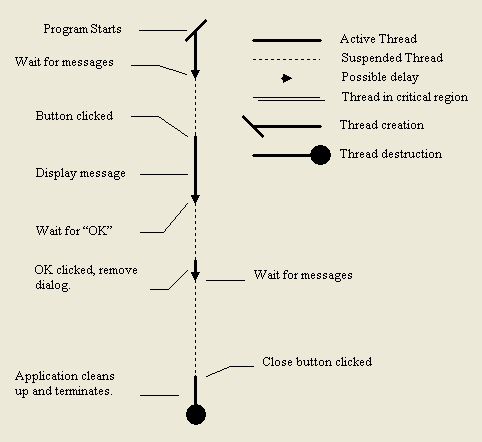
What are threads? and why we use them? Earlier days of programming all programs were single threaded and single tasking in which your program will ran exclusively on the machine  or not at all. With increasingly sophisticated applications and increasing demands on personal computers, now multiprocessing and multithreading  operating systems are available. Multithreading on computer programming was mainly required for better performance and usability. So first lets go about Process , Process is a program that runs on a system and uses system resources like CPU, Memory etc. And every process has  a main thread. In a Process many actions can be performed one by one on fast in fast perform order. And Thread is generally used to perform several  set of actions at once in situations like some actions may cause a considerable delay  but during that period the program should be able to perform other actions too. For an example in windows explorer we are copying ...